There are 65 possible GPIO pins that you can control. Some of the GPIO pins are normally configured to different functions. Let's play with one of them.
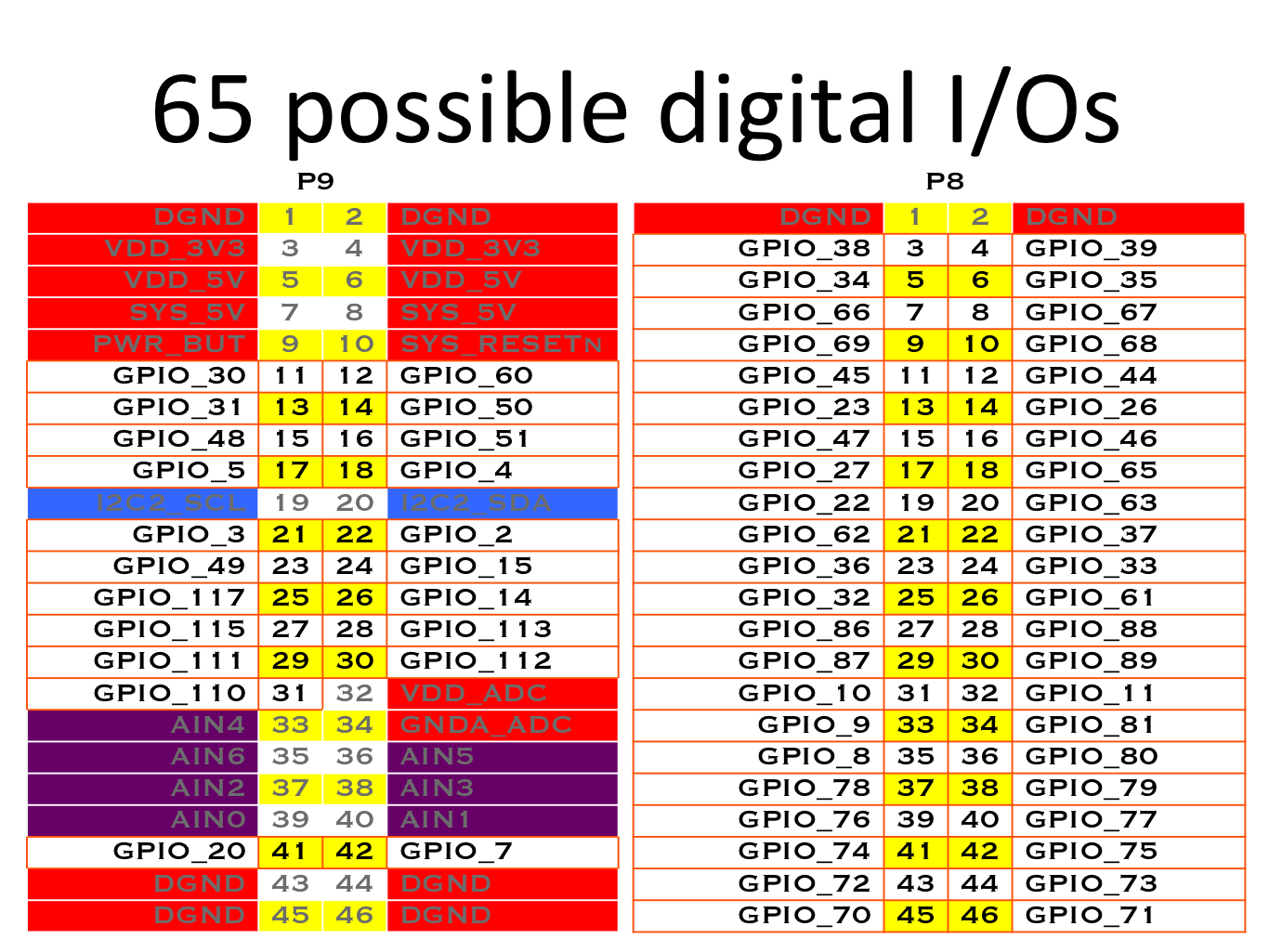
Go to the beaglebone website and figure out the header pin corresponding to gpio23.

The gpio23 is mapped to the 13th header pin. In this tutorial we are testing the gpio23 output using a multimeter (Do not connect an LED directly to BBB IO pin).
First go to following directory
cd /sys/class/gpio/
Then make gpio23 available
echo 23 > export
A new directory will be created. Open gpio directory.
cd gpio23
The direction of IO will be normally set as in (input). To make it as output,
echo out > direction
Then set the pin to high using
echo 1 > value
Measure the voltage at pin 13 of P8 header. If its 3.3 V then you are on the right track. Pin 1 and 2 will be ground. You can connect the negative terminal of multimeter to pin 1 or 2.
To set output as zero,
echo 0 > value
After finished with the tutorial unexport the gpio23 pin.
cd ..
echo 23 > unexport
To get a better idea refer this site.
Go to the beaglebone website and figure out the header pin corresponding to gpio23.
The gpio23 is mapped to the 13th header pin. In this tutorial we are testing the gpio23 output using a multimeter (Do not connect an LED directly to BBB IO pin).
First go to following directory
cd /sys/class/gpio/
Then make gpio23 available
echo 23 > export
A new directory will be created. Open gpio directory.
cd gpio23
The direction of IO will be normally set as in (input). To make it as output,
echo out > direction
Then set the pin to high using
echo 1 > value
Measure the voltage at pin 13 of P8 header. If its 3.3 V then you are on the right track. Pin 1 and 2 will be ground. You can connect the negative terminal of multimeter to pin 1 or 2.
To set output as zero,
echo 0 > value
After finished with the tutorial unexport the gpio23 pin.
cd ..
echo 23 > unexport
To get a better idea refer this site.
Comments
Post a Comment